Bitplan

Bitplan

New software for classic Amiga


« Back to Amiga software

GoVD - Virtual Desktops for Workbench

GoVD - virtual desktops on Amiga Workbench

About GoVD

If you use Workbench and often run multiple programs, you know how cluttered the screen can get, making it difficult to find the window you're looking for.

GoVD extends your Workbench screen to up to eight virtual desktops, making it much easier to manage your workspace. You decide which Workbench windows and programs are displayed on each desktop.

Just switch desktops, and everything is neatly organized. With GoVD, you can break free from the limitations imposed by Commodore's traditional desktop layout and take full control of your workspace.

Main features

  • Up to 8 virtual desktops
  • Intuitive configuration tool
  • Easy setup for the appearance and content of each virtual desktop
  • Define which programs and windows to display on each desktop (e.g. clock, calendar, ToolbarManager or similar)
  • Keyboard shortcuts for switching between desktops
  • ARexx port for scripting and external control
  • Works as a Commodity - managed via the system Exchange tool
  • Support for Directory Opus Magellan

Requirements

Any Amiga with AmigaOS 3.2 or higher.
Should also work with OS 3.1.4 if intuition.library v46 is present.


License and registration

GoVD is distributed as Shareware. The unregistered version is fully functional but shuts down after 20 minutes of use.

If you like GoVD, please register it. You will receive a personalized key and access to the unlimited version.

The registration amount is entirely up to you - decide for yourself how much GoVD is worth.

If you are a developer who has uploaded software to Aminet, you can receive your GoVD key for free - just send an email.


Download

Version Date Link
3.1 (latest) 2026-05-22 GoVD.lha (Aminet)

Installation

Copy the GoVD-conf configuration tool to any directory (e.g., Prefs), and copy the GoVD program to WBStartup to launch it automatically when Workbench starts.

Usage

After launching GoVD, a control window will appear on the Workbench showing buttons for each virtual desktop. Simply click on a button to switch between desktops. Each desktop will display its own set of windows, allowing you to switch tasks seamlessly without cluttering the screen.

ARexx support

GoVD exposes an ARexx port named REXXGOVD.n, which allows you to control the program from ARexx scripts or other ARexx-aware programs. Supported commands:

  • SHOW - show the desktop switcher GUI window
  • HIDE - hide the desktop switcher GUI window
  • NEXT - switch to the next virtual desktop
  • PREV - switch to the previous virtual desktop
  • SWITCH n - switch to a specific desktop (1-8)
  • QUIT - quit GoVD
  • GETNUMBEROFDESKTOPS - get the number of virtual desktops
  • GETNUMBEROFCURRENTDESKTOP - get the number of the current virtual desktop

For a detailed description of all ARexx commands, return codes and script examples, see GoVD.guide.

Known issues

Workbench strictly enforces the rule that you cannot open more than one window for the same directory. For example, if you open a window for the RAM: disk, you cannot open a second window for RAM:. GoVD does not solve this issue, so a RAM: window may only appear on one desktop, regardless of how many virtual desktops you create.

GoVD allows you to enable or disable the display of directory windows on all desktops to work around this limitation.


Screenshots

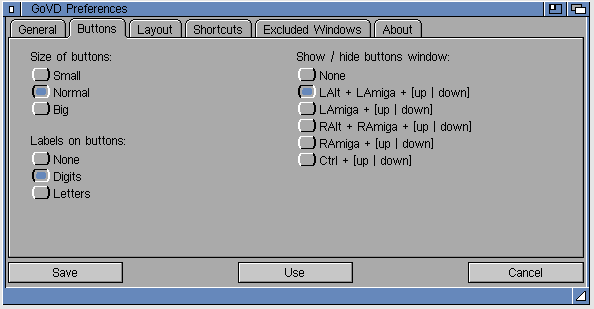
Preferences - Buttons

GoVD preferences - buttons configuration

Preferences - Layout

GoVD preferences - layout configuration

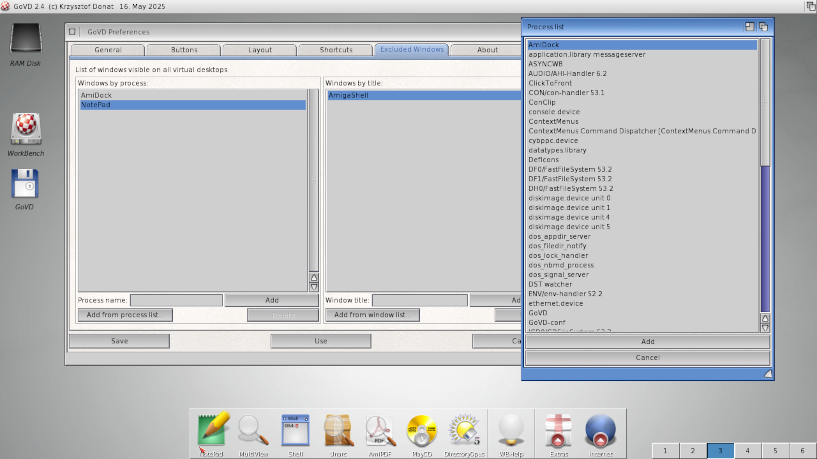
Preferences - Excludes

GoVD preferences - excludes configuration

GoVD on AmigaOS 4

GoVD running on AmigaOS 4


Version history

3.1 (2026-05-22)

  • Fixed GURU crash on program startup under AmigaOS 4
  • Added two new ARexx commands: GETNUMBEROFDESKTOPS, GETNUMBEROFCURRENTDESKTOP

3.0 (2026-05-17)

  • Added ARexx port for scripting and external control

2.7 (2026-04-17)

  • Added new shortcuts for switching to the next and previous desktop

2.6 (2026-04-15)

  • Fix for showing hidden GoVD window with shortcuts

2.5 (2025-12-27)

  • Added support for Directory Opus Magellan

2.4 (2025-05-16)

  • Improved compatibility with OS 4.x
  • Added icons by EctoOne

2.3 (2025-04-05)

  • Some performance optimizations

2.2 (2025-03-17)

  • Fixes in the "GoVD Window Always on Top" algorithm and window movement using the depth gadget

2.1 (2025-01-06)

  • Added the option to move active WB windows to the current desktop
  • Added the option to precisely set the width and height of buttons (4 to 64 pixels)
  • Improved refresh on RTG screens
  • Fixed a bug in the configuration program in the process search window

2.0 (2025-01-01)

  • Keyboard shortcuts for switching between desktops, next/previous and hiding the button window
  • Pixel-perfect positioning of the virtual desktop button window
  • Option to start GoVD in hidden mode
  • Support for screennotify.library - allows changing Workbench screen resolution without restarting GoVD
  • GoVD now functions as a Commodity (manageable via the Exchange tool)
  • Demo version: fully functional but limited to 20 minutes
  • Restart GoVD from the configuration tool

1.3 (2024-11-14)

  • Improved process listing in the configuration tool
  • Sorting of process and window lists in the configuration tool

1.2 (2024-11-10)

  • Adapted library versions to support OS 3.1.4
  • Fixed the algorithm for detecting Workbench windows

1.0 (2024-10-11)

  • Initial release

© 2026 Bitplan  —  Krzysztof Donat